Skip to content
  • There are no suggestions because the search field is empty.

Partly Repair Updates - February 2026

The latest improvements we've made to the Repair app based on your valuable feedback

The team has been hard at work making improvements to the repair app this month. This includes a large number of integration improvements as well as a number of quality-of-life updates.

The Repair App has moved to the Partly App:

When syncing a parts list before ordering remember to use the "Save Selection" button before syncing. Without this your part prices will not sync across.

Sidebar Improvements:

  • We have improved a number of issues with the sync functionality:
    • Used parts will now sync appropriately. 
    • Assemblies and Bulk offers will now sync with the correct pricing.
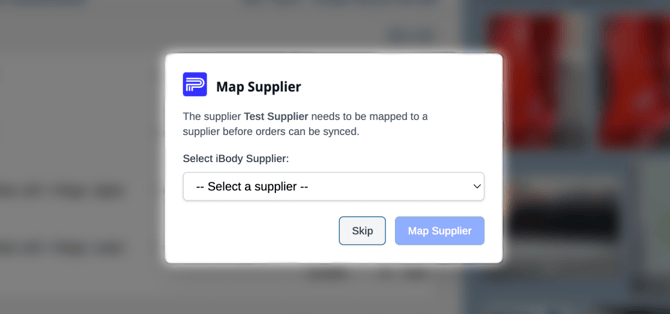
  • You can now map suppliers between Partly and your BMS without waiting for a member of the Partly team.
    • If you try to sync an order and Partly doesn't know which supplier it belongs to, you will be prompted to "Map" the supplier. 
    • If the supplier isn't available in the dropdown list you will need to add them to your BMS suppliers list and then try the sync again

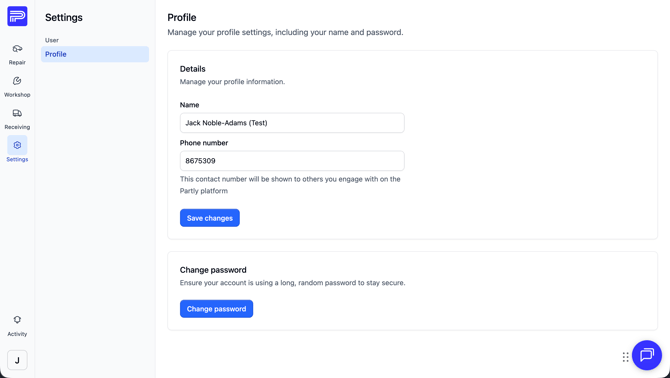
Phone Numbers and Password Changing in Partly:

  • We've been listening and now phone numbers are available in the repair app.
  • These numbers are available for both repairers and suppliers, but it is an opt in system. You will need to add a number for yourself as will the Suppliers.
  • You can also change your password yourself to whatever you like.
  • Make your way to the settings menu to do this:

  • If you want to see the number for a supplier all you need to do is click on their name where it appears on the Home or Supply page.


Custom Parts Mapped to Diagram parts:

  • Sometimes it is easier to just add the required parts directly to your parts list. But this comes with downsides. When parts aren't linked to the diagram the supplier doesn't receive the diagram image or a part number.
  • We've made some changes and now you can match your handwritten parts list to our diagram parts. See the video below for an example.


Quick Diagram Previews:

  • While browsing the diagrams you can hover over the thumbnails to get a larger preview of the parts.


A new Live Chat button:

  • With the change to the Partly App the livechat button has changed. You'll now see it as a floating "Bubble" in the App.
    • You can move this bubble around by clicking and dragging on the dots just to the left of the bubble. 


We’re not done! Further improvements in the pipeline. 

We’re continuously refining the Repair App based on your feedback. From smoother estimating to smarter part sourcing, there’s more on the way, but as always, we’d love to hear your ideas at helpdesk@partly.com.