Skip to content
  • There are no suggestions because the search field is empty.

Job Summary is now on the Order page

Share details with suppliers from the Orders page. Open the pop up any time to add notes, upload photos, and flag potential total loss vehicles.

Why the change:

The Summary page was a fixed step in the job flow. Moving these details into a menu on the Order tab means:

  • One less step between Estimation and Supply
  • Details are editable at any time, not just at the start
  • Information is automatically shared with every supplier, without a separate confirmation step

Where to find it:

page context


  1. Order tab. Job details are live on the Order tab, previously known as the Supply page.

  2. Supplier Job Context. A summary card at the top of the Order tab shows what is currently shared with suppliers: photo count, notes preview, and total loss avoidance status. Click anywhere on the card to open the modal and edit.

The modal also opens automatically the first time you visit the Order tab on a job.

Inside the menu:

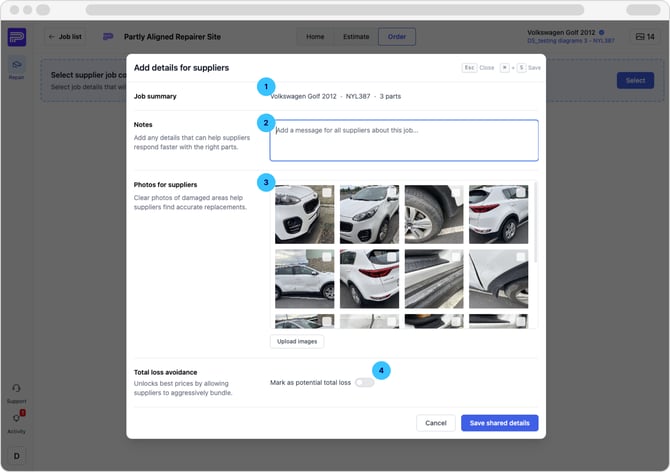
supplier details

  1. Job summary. Read-only context at the top, vehicle, rego, and part count, so you can confirm you're on the right job.

  2. Notes. Add any details that help suppliers respond faster with the right parts. include specific requirements, condition preferences, or anything else relevant to the repair.

  3. Photos for suppliers. Upload images so suppliers can see the damage and find accurate replacements. Click Upload images to drag and drop or select files. Images synced from your BMS are automatically displayed here.

  4. Total loss avoidance. If the vehicle is a potential write-off, enable Mark as a potential total loss. This signals to suppliers that aggressive bundling is appropriate and unlocks the best prices, enabling them to respond with discounted bundles across the full parts list.

Click Save shared details to save. Everything is automatically shared with every supplier on the job.


We’re not done! Further improvements in the pipeline. 

We’re continuously refining the Repair App based on your feedback. From smoother estimating to smarter part sourcing, there’s more on the way, but as always, we’d love to hear your ideas at helpdesk@partly.com.